Font RAM Optimization in Unity
Stripping duplicate TextMesh Pro font memory on a standalone VR build.
The issue
TextMesh Pro (TMP) font assets in Unity have a requirement: any font referenced via a <font="Name">rich-text tag or assigned as a TMP Settings default must live inside a Resources folder. At the same time, the Addressables build pipeline packs anything reachable from a scene, prefab, or preloaded asset list into its own bundles. Any font asset that satisfies both systems at once eventually gets pulled into memory twice: once by the Resources loader at startup, once by the addressable bundle.
It may not seem like a huge issue, but on Android VR hardware memory is one of the largest concerns, especially on older platforms like Quest 2. Combined with Chinese/Japanese/Korean localization and different font width styles, a project can easily end up with an extra 150 MB of unused memory in RAM.
A 3-step solution
- 01
Build action: font stripping
A custom pre-build action that walks every prefab, scene and material, removes font and font material references, and records where each one was.
- 02
Build action: validation
A custom post-build action that fails the build step if any forbidden reference survives in Resources, scenes, preloaded assets, or always-included shaders.
- 03
Runtime: font loading
A loader that restores the stripped references from Addressables at runtime, after the build-only copy is already excluded.
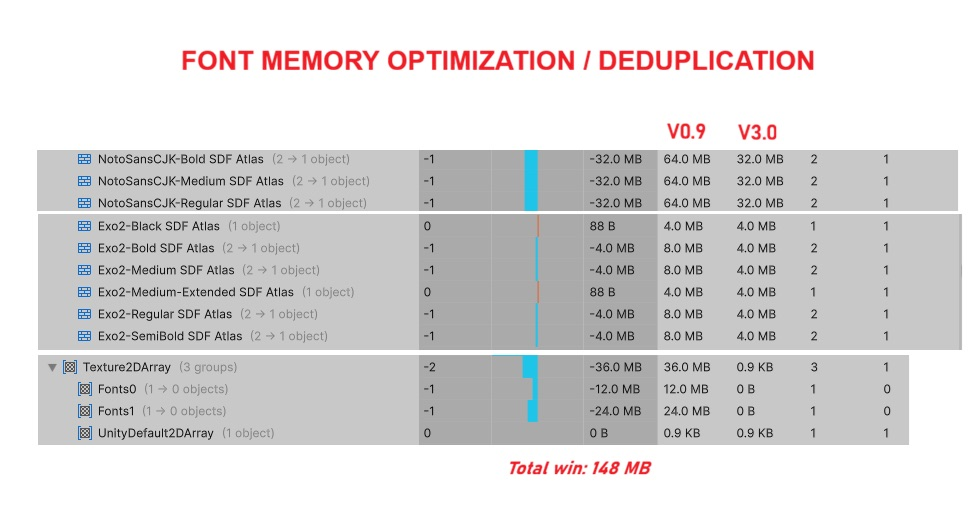
Measured impact
Tracking down every reference
The hard part was never writing code that strips fonts in Resources. That logic is straightforward if you know how to loop over prefabs and active scenes and have basic knowledge of ScriptableObjects.
The difficult part was finding every place, or category, where font references hide. TextMesh Pro spreads font and material references across more entities than the inspector suggests. This is the list that actually mattered for this project:
Where font references actually live
TMP_Textcomponents: the font asset field itself, and them_sharedMaterialandm_fontSharedMaterialsfields.- Custom text components wrapping a font set collection asset, resolved through a separate indirection layer instead of TMP's own font field.
TMP_SubMeshUI/TMP_SubMeshchild objects, which TMP creates automatically for multi-atlas text and which carry their own independent font and material slots.- The TMP Settings default font asset and fallback font list: global, singleton-style references that pull a font into every build regardless of whether any scene uses it.
- Per-font fallback tables (
m_FallbackFontAssetTable), where one font asset references another, creating a chain that the build pipeline treats as a hard dependency. - Always Included Shaders in Graphics Settings and Preloaded Assets in Player Settings. Neither shows up when browsing a scene, but both are root objects the build pipeline keeps alive unconditionally.
- Nested prefab variants, where the base prefab's font reference lives on the base asset and a variant's stripped override doesn't propagate backward. The base has to be re-checked independently, not just walked transitively from the variant.
But the list is not set in stone
Font references may live in other places; it's very individual to each project. That's why the validator exists. Every one of those surfaces can silently regress. For example: a teammate adds a fallback font, or an artist drags a material back onto a header prefab to preview it. BOOM, and the duplication is back. Quietly, with no error, until someone runs a memory capture on-device weeks or even months later. Catching it at build time, with the exact dependency chain printed in the logs for the developers, is as important as the stripping logic itself.
The other half: material atlases
If you look at the Memory Profiler picture carefully, you will notice memory improvements in the Texture2DArray block. Stripping the font assets solved half the duplication. The other half was a batched UI material that samples six font atlases (2 language types × 3 weights). Those were packed as individual textures on one shared material, used across the whole UI to keep draw calls low. The naive fix was a Texture2DArray built at import time, copying every atlas into one array texture. That works, but at the cost of every atlas being copied: one inside each TMP_FontAsset, and one duplicated into the array.
To fix it, the batched UI material's atlas slots are now populated by OnGUI-stage code that reads each atlas directly off the live TMP_FontAsset objects and assigns them straight onto the material's texture properties. No array, no copy: the material points at the same atlas textures the font assets already own in memory. The font assets stay the single owner and the batched material just references them.
Technical highlights
- Pre-build stripping
- Nulls font and material references before the build.
- Runtime loading
- Restores the references from Addressables at load time.
- Dependency graph walk
- Validates Resources, scenes, shaders and preloaded assets.
- Nested prefab convergence
- Iterates until base prefabs are clean too.
- Direct atlas binding
- No Texture2DArray copy for the batched UI material.
- Remap table
- Records every stripped reference so it can be restored later.
- Build-time failure
- Fails with the exact dependency chain in the log.